

NOTE: This post is part of our community contributor series, sharing real-world experiences from vetted digital marketing and development professionals. All views and technical approaches expressed are those of the individual author.
You don’t need a $99-a-month subscription to know where your pages rank on Google.
When I started building out my own sites, I had zero budget for SEO software, and I still needed to answer one basic question every week: are my pages moving up or down?
You can answer that well with free tools, as long as you combine them the right way. No single free tool does everything a paid platform does. Stacked together, though, they cover about 90% of what most site owners actually need.
Here’s the exact workflow I use. It takes about 30 minutes a week.
Why Bother Tracking Rankings at All?
Rankings are the earliest signal you get that something is working, or breaking. Traffic numbers lag. By the time traffic drops, the slide started weeks ago. But a page slipping from position 6 to 14 is a warning light you can act on, and a climb from 18 to 9 proves your last content update worked.
Without tracking, every SEO decision is a feeling. With tracking, it’s a number. That difference matters more than any single tool.
Method 1: Google Search Console, Your Free Command Center
If you only use one free method, make it this one. Google Search Console (GSC) is free, it’s Google’s own data, and most site owners barely scratch the surface of what it shows.
Open the Performance report. For rank tracking, the two metrics that matter are impressions and average position. Here’s how I actually use it:
Filter by page first. Pick a URL and see which queries bring it impressions and its average position for each. That tells you not just where you rank, but for what, which most people never check.
Then filter by query. Take your money keyword and see every page earning impressions for it. Sometimes a page ranks for something you never targeted. That’s Google handing you a content idea.
Use Compare. Pit the last 28 days against the previous 28 and sort by position change. The biggest drops go straight to the top of your fix list.
Set the country filter if your audience sits in one place. An average of position 8 in the US and 40 in India blends into a meaningless number otherwise.
The honest caveats: data runs two to three days behind, positions are averaged across locations and devices (so “7.3” isn’t your rank for everyone), and it only covers sites you own. Still, for your own site, it’s the most trustworthy free data there is. Start here.
Method 2: Free Rank Checkers for Quick Spot-Checks
GSC is great for trends, but sometimes you want a simpler answer: where do I rank for this keyword, right now? Maybe you published yesterday and want a quick read. For that, a free rank checker beats digging through Search Console.
The key phrase is free without a signup wall. Plenty of “free” tools allow one check, then demand your email. For quick spot-checks, look for a free rank checker that shows your live Google position with no account needed.
Use it for what it’s good at: instant answers for a handful of keywords. And always note the location. A keyword can sit 4th in New York and 25th in London, so set the location to wherever your audience actually is.
Method 3: The Old-School Manual Check (Use Sparingly)
Yes, you can just Google it yourself: incognito window, logged out, location set. I’ll be straight with you. That works fine for two or three keywords when you’re curious. It doesn’t scale, and it’s less clean than people think, since Google still personalizes more than incognito suggests.
Use manual checks as a gut-check, not a system. If a tool says 5th and your own search shows page one, that’s confirmation enough. If they disagree wildly, trust the tool over your browser.
Method 4: The Spreadsheet That Ties It All Together
This is the part most people skip, and it’s what makes everything else useful. Tools give you snapshots; a spreadsheet gives you a story. It takes ten minutes to build.
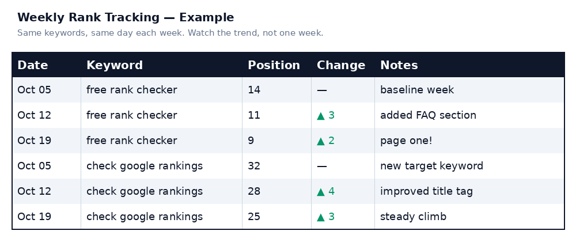
Once a week, log positions for your 20 to 50 most important keywords. Pull numbers from Search Console, spot-check the big ones with a rank checker, and let a simple formula calculate the change.
Then color-code it: green for gains of 3+, red for drops of 3+, nothing for noise. After a month, patterns jump off the screen. Steady climbers, bleeders, and stuck pages, all visible at a glance. The red rows become your to-do list. No more wondering what to work on.
Create a sheet with these columns: Keyword, Target URL, Current Position, Last Week’s Position, Change, Notes.
Keep it to keywords that matter. Tracking 500 keywords in a spreadsheet is a second job. Twenty to fifty is the sweet spot for most small sites.
The 2026 Workflow: 30 Minutes a Week
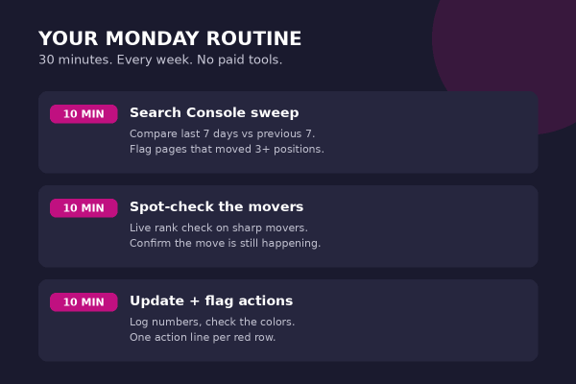
Here’s how the four methods fit into one routine. Every Monday morning:
Minutes 1–10: Search Console sweep. Compare the last 7 days to the previous 7. Note any page that moved more than 3 positions on average, and jot the big movers into your sheet.
Minutes 10–20: Spot-check the movers. Run a live rank check on anything that shifted sharply. GSC data is days old; this tells you whether the move is still happening or already reversing.
Minutes 20–30: Update and flag. Log the numbers, glance at the colors, and write one line next to each red row: what you’ll do about it this week. Done.
Once a month, go deeper: the 28-day compare, queries gaining impressions with low CTR (title-rewrite candidates), and a check that your keyword list still matches your priorities.
Search Console
Pull Performance data: impressions + Avg. position. Compare 7 vs. 7 days.
FREE Rank Checker
Spot-check sharp movers live. No signup wall. Set audience location.
Spreadsheet
Log 20-50 keywords weekly; green = 3+; red = 3-
Take Action
Page 2 (11-20) = refresh. Sudden drops = Investigate. Climbers = Link up
The 2026 free rank-tracking workflow: four methods, one weekly routine.
This system runs on discipline, not dollars. The winners aren’t the ones with the fanciest dashboard. They’re the ones who check every single week.
What to Actually Do With the Data
Tracking without action is just a hobby. Here’s how to turn numbers into work:
Positions 11–20 are your goldmine. Page two means Google almost trusts the page. Refresh the content, out-cover whoever ranks above you on the key subtopic, sharpen the title, and check back in two weeks. Best effort-to-reward ratio in SEO.
Sudden drops (5+ in a week) mean something changed. Check search intent match, stronger new competitors, or a Google update. Don’t panic on day one; don’t ignore it past day seven.
Steady climbers deserve reinforcement. A page that went 25 to 12 in two months? Point internal links at it from related posts. That nudge often lands it on page one.
Keywords you rank for but never targeted are free content briefs. If GSC shows impressions for a keyword the page barely mentions, write the section that keyword deserves.
The Honest Limitations
Free tracking has real ceilings. No daily updates for hundreds of keywords. No true competitor tracking. GSC averages hide as much as they reveal, and free checkers cap daily searches.
Paid tools make sense eventually. If SEO drives real revenue and you’re tracking hundreds of keywords across locations, one pays for itself in saved time. I’m not anti-paid-tool. I’m anti paying before you need to.
Most people considering paid tools haven’t outgrown the free workflow. They just haven’t built it yet. Run this system for three months. If you’re hitting its limits every week, you’ve earned the upgrade.
Start This Week
You already have everything you need. Search Console is free, a rank checker is one search away, and the spreadsheet takes ten minutes.
The biggest ranking-tracking mistake isn’t using the wrong tool. It’s not tracking at all, then wondering six months later why traffic quietly fell off a cliff.
Pick your 20 keywords. Build the sheet. Check in next Monday. Future you will be glad you started.

Leave a Reply